IN
INundefined
Touchscreen Monitors
48 products available
𝗪𝗵𝗮𝘁 𝗮𝗿𝗲 𝗧𝗼𝘂𝗰𝗵𝘀𝗰𝗿𝗲𝗲𝗻 𝗠𝗼𝗻𝗶𝘁𝗼𝗿𝘀?
Touchscreen monitors are display devices that allow users to interact with a computer or other digital systems through touch input. These monitors combine traditional display capabilities with touch-sensitive technology, enabling users to control applications and access information simply by touching the screen. This intuitive interaction method has gained popularity due to its ease of use and efficiency in various settings.
In a business context, touchscreen monitors are commonly used in retail environments, conference rooms, and industrial applications. They facilitate direct engagement with content, making them ideal for kiosks, point-of-sale systems, and interactive presentations. Their versatility extends to training and educational settings, where hands-on interaction enhances learning experiences. As industries increasingly adopt digital solutions, the relevance of touchscreen monitors continues to grow, presenting opportunities for improved workflow and customer engagement.
The market for touchscreen monitors is evolving, with advancements in technology leading to better resolution, responsiveness, and durability. Businesses are increasingly recognizing the value of these devices in enhancing user experiences and streamlining operations across various sectors.
𝗞𝗲𝘆 𝗙𝗲𝗮𝘁𝘂𝗿𝗲𝘀 𝗮𝗻𝗱 𝗦𝗽𝗲𝗰𝗶𝗳𝗶𝗰𝗮𝘁𝗶𝗼𝗻𝘀
Touchscreen monitors are equipped with several features that enhance their functionality and usability. When considering these devices, it is essential to understand their technical specifications to ensure they meet business needs.
Key specifications include:
1. Display Technology
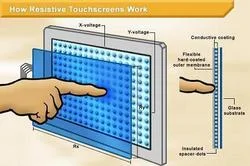
- Common technologies include resistive and capacitive displays.
- Capacitive displays offer better touch sensitivity and multi-touch capabilities.
2. Screen Size
- Available in various sizes ranging from 10 inches to over 32 inches.
- Larger screens are suitable for collaborative environments.
3. Resolution
- Standard resolutions include Full HD (1920 x 1080) and 4K (3840 x 2160).
- Higher resolutions provide clearer images and better detail.
4. Touchscreen Type
- Options include single-touch and multi-touch capabilities.
- Multi-touch allows for more complex interactions.
5. Connectivity Options
- Common interfaces include HDMI, USB, and VGA.
- Wireless connectivity options may also be available.
6. Operating System Compatibility
- Many monitors are compatible with multiple operating systems, including Windows, Linux, and Android.
- Compatibility ensures seamless integration with existing systems.
7. Mounting Options
- Touchscreen monitors can be wall-mounted, stand-mounted, or used as desktop displays.
- Versatile mounting options allow for flexibility in installation.
8. Durability Ratings
- Some monitors are designed for industrial use with enhanced durability features.
- Ratings such as IP65 indicate resistance to dust and water.
In summary, understanding these specifications helps businesses choose the right touchscreen monitors that align with their operational requirements.
𝗖𝗼𝗺𝗺𝗼𝗻 𝗔𝗽𝗽𝗹𝗶𝗰𝗮𝘁𝗶𝗼𝗻𝘀 𝗮𝗻𝗱 𝗨𝘀𝗲 𝗖𝗮𝘀𝗲𝘀
Touchscreen monitors find applications across diverse industries, enhancing user interaction and streamlining processes.
1. Retail: Touchscreen monitors are widely used in retail environments for point-of-sale systems. They enable quick transactions and improve customer engagement through interactive displays.
2. Education: In educational settings, touchscreen monitors facilitate interactive learning experiences. They allow educators to engage students with hands-on activities and collaborative projects.
3. Healthcare: Touchscreen monitors are utilized in healthcare for patient check-ins and data management. Their ease of use enhances efficiency in busy medical environments.
4. Hospitality: In the hospitality industry, touchscreen monitors serve as information kiosks for guests. They provide easy access to hotel services, local attractions, and event information.
5. Manufacturing: Touchscreen monitors are employed in manufacturing settings for process control and monitoring. They enable operators to interact with machinery and access real-time data.
6. Transportation: In transportation, touchscreen monitors are used in public transit systems for route information and ticketing. They enhance user experience by providing quick and accessible information.
7. Corporate: Touchscreen monitors are valuable in corporate environments for presentations and meetings. They facilitate interactive discussions and visual collaboration.
𝗣𝗿𝗼𝗱𝘂𝗰𝘁 𝗩𝗮𝗿𝗶𝗮𝗻𝘁𝘀 𝗮𝗻𝗱 𝗦𝘂𝗯𝗰𝗮𝘁𝗲𝗴𝗼𝗿𝗶𝗲𝘀
Touchscreen monitors come in various configurations to cater to different business needs.
Variant 1: Interactive Touchscreen Displays
These displays are designed for educational and training environments. They often include advanced touch capabilities and integrated software for interactive learning experiences.
Variant 2: Industrial Touchscreen Monitors
Built for durability, these monitors are suited for harsh environments. They feature rugged designs and are resistant to dust and moisture, making them ideal for manufacturing and outdoor use.
Variant 3: Portable Touchscreen Monitors
Lightweight and compact, portable touchscreen monitors are perfect for on-the-go presentations. They offer easy connectivity and can be easily transported between locations.
𝗕𝗲𝗻𝗲𝗳𝗶𝘁𝘀 𝗮𝗻𝗱 𝗔𝗱𝘃𝗮𝗻𝘁𝗮𝗴𝗲𝘀
Investing in touchscreen monitors offers numerous advantages for businesses.
1. Enhanced User Engagement: Touchscreen monitors promote interactive experiences, keeping users engaged and improving overall satisfaction.
2. Increased Efficiency: Direct touch input eliminates the need for peripheral devices, streamlining workflows and reducing time spent on tasks.
3. Versatile Applications: Their adaptability allows touchscreen monitors to be used across various industries and settings, making them a valuable investment.
4. Improved Collaboration: In corporate environments, touchscreen monitors facilitate teamwork by allowing multiple users to interact with content simultaneously.
5. Space-Saving Design: Many touchscreen monitors can be wall-mounted or integrated into existing systems, saving valuable workspace.
6. Customization Options: Touchscreen monitors can often be tailored to meet specific business needs, enhancing functionality and usability.
𝗕𝘂𝘆𝗶𝗻𝗴 𝗚𝘂𝗶𝗱𝗲 𝗳𝗼𝗿 𝗕𝟮𝗕 𝗕𝘂𝘆𝗲𝗿𝘀
When sourcing touchscreen monitors, several factors should be considered to ensure the right purchase.
1. Quality Assessment: Assess the quality of the monitors by checking reviews and performance ratings. Look for devices with a good track record in durability and functionality.
2. Supplier Verification: Vet suppliers to ensure they are reputable and reliable. Check for certifications and customer feedback to gauge their credibility.
3. Pricing and MOQ: Consider the cost of the monitors and any minimum order quantities that may apply. Balance quality with budget constraints to find the best value.
4. Delivery and Lead Times: Take into account logistics and lead times for delivery. Ensure suppliers can meet your timeline to avoid project delays.
5. Compliance Requirements: Verify that the monitors meet any necessary industry compliance and safety standards, ensuring they are suitable for your specific applications.
𝗖𝗼𝗺𝗽𝗹𝗶𝗮𝗻𝗰𝗲 𝗮𝗻𝗱 𝗖𝗲𝗿𝘁𝗶𝗳𝗶𝗰𝗮𝘁𝗶𝗼𝗻𝘀
Touchscreen monitors must adhere to various compliance and certification standards to ensure quality and safety in their operation.
Relevant quality standards include ISO 9001, which focuses on quality management systems. This certification ensures that manufacturers maintain high-quality production processes.
Industry certifications such as CE indicate that the products comply with European health, safety, and environmental protection standards. These certifications are essential for ensuring that the monitors are safe for use in various applications.
Safety and testing requirements are also critical, as they ensure that the monitors can withstand operational demands without posing risks to users.
Regional compliance considerations may vary, so it is essential to verify that the monitors meet local regulations, especially when sourcing from different countries.
𝗪𝗵𝘆 𝗦𝗼𝘂𝗿𝗰𝗲 𝗧𝗼𝘂𝗰𝗵𝘀𝗰𝗿𝗲𝗲𝗻 𝗠𝗼𝗻𝗶𝘁𝗼𝗿𝘀 𝗳𝗿𝗼𝗺 𝗣𝗲𝗽𝗮𝗴𝗼𝗿𝗮?
Pepagora provides a trusted platform for sourcing touchscreen monitors, offering several key advantages that benefit B2B buyers.
Verified Supplier Network: Pepagora ensures that all suppliers in their network are thoroughly vetted. This verification process helps buyers connect with reputable manufacturers and distributors, reducing the risk of subpar products.
Streamlined RFQ Process: The platform features a user-friendly request-for-quotation system. Buyers can easily submit their requirements and receive competitive quotes from multiple suppliers, simplifying the sourcing process.
Trade Assurance and Support: Buyers benefit from trade assurance measures that protect their investments. Pepagora offers support throughout the purchasing process, ensuring buyers have access to assistance when needed.
Regional Coverage: Pepagora's extensive network spans India, the GCC, and Southeast Asia. This geographic reach enables buyers to find suitable touchscreen monitors tailored to their specific regional needs.
Newly Added







Recently Added
Vin Technologies
HP Laptop CNC Machining Black Paint Polish Long Battery
Business Dell Laptop CNC Machining Black Long Battery Life
Professional Sony Laptop CNC Machining Black Strong Sturdy Long Battery
Adaptek Automation Technology
Industrial HMI LCD Display Allen Bradley PV600 2711 K3A5L1 Keypad
Industrial HMI Siemens TP270 Touch Panel Automation Control
GSM Alarm Controller For Remote Monitoring And SMS Control
AV Media Solutions
Professional Desktop Projector 3000 Lumens XGA Resolution Sony VPL D Series
Professional Desktop Projector VPL DX15 High Brightness USB PC Less
Professional Fixed Installation DLP Projector For Boardrooms And Classrooms
Aarzoo Traders
Heavy Duty Battery Terminal Cables Copper Conductors Heat Resistant
Industrial Automation High Quality Used Limit Switches For Machinery Safety
Industrial Used Armored And Non Armored Wires For Electrical Infrastructure
Joseph Digital Solutions
Dynamic Digital Signage Displays For Retail And Hospitality Engagement
Digital Menu Boards For QSRs Dynamic Displays Boost Sales
Digital Menu Boards For Restaurants With Dynamic Display
Suvira International India
Retail Hologram Showcases Premium 3D Visuals For Exhibitions
Premium Hologram Showcases For Retail And Exhibition 3D Displays
Professional Mic Lift For Presentations And Events With Durable Design
Why Businesses Trust Pepagora
Thousands of companies trust Pepagora to source smarter and sell faster
Expand Your Sales Globally
25000+Products listed.Get discovered by global buyers
Tools to boost visibility
Build your own catalog

Source Smarter,Grow Faster
4000+Active RFQs
100+ Countries served
Easy Sourcing Tools