IN
INundefined
Presentation Clickers & Laser Pointers
4 products available
𝗪𝗵𝗮𝘁 𝗮𝗿𝗲 𝗣𝗿𝗲𝘀𝗲𝗻𝘁𝗮𝘁𝗶𝗼𝗻 𝗖𝗹𝗶𝗰𝗸𝗲𝗿𝘀 & 𝗟𝗮𝘀𝗲𝗿 𝗣𝗼𝗶𝗻𝘁𝗲𝗿𝘀?
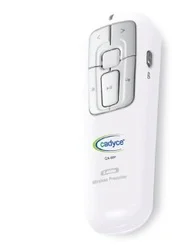
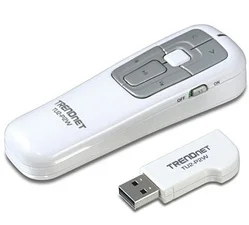
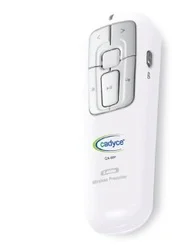
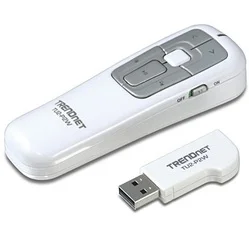
Presentation clickers and laser pointers are essential tools designed to enhance the effectiveness of presentations and public speaking engagements. A presentation clicker, also known as a remote control for presentations, allows presenters to navigate slides seamlessly from a distance. Laser pointers, on the other hand, provide a visual aid to highlight specific areas on a screen or board, making it easier for the audience to follow along with the presenter's points.
These tools are primarily used in business environments, educational settings, and at conferences. Professionals rely on presentation clickers to maintain engagement and control during their talks, while laser pointers help in emphasizing critical information and guiding the audience’s attention. The demand for these devices has surged in recent years due to the growing trend of remote presentations and digital communication. As businesses adapt to new technologies, the relevance of these tools in facilitating effective communication remains strong.
𝗞𝗲𝘆 𝗙𝗲𝗮𝘁𝘂𝗿𝗲𝘀 𝗮𝗻𝗱 𝗦𝗽𝗲𝗰𝗶𝗳𝗶𝗰𝗮𝘁𝗶𝗼𝗻𝘀
Presentation clickers and laser pointers come equipped with a variety of features that enhance usability and functionality. Understanding these specifications is crucial for selecting the right device for your needs.
Key specifications include:
1. Wireless Range
- Presentation clickers typically offer a wireless range of up to 100 feet, allowing presenters to move freely within a room.
- Laser pointers may have varying ranges depending on the model, generally effective up to 500 meters in open areas.
2. Battery Life
- Long-lasting battery life is essential, with many devices offering 20 to 30 hours of use on a single charge.
- Some models include rechargeable batteries, while others use standard batteries.
3. Compatibility
- Most presentation clickers are compatible with major operating systems, including Windows, macOS, and Linux.
- Ensure that the device works with the software programs commonly used for presentations, such as PowerPoint and Google Slides.
4. Design and Ergonomics
- Many clickers feature a compact and ergonomic design for comfortable handling during long presentations.
- Some models include dedicated buttons for specific functions, such as volume control and laser activation.
5. Laser Type
- Laser pointers may use different types of lasers, such as red or green lasers, impacting visibility in various lighting conditions.
- Green lasers are typically easier to see in daylight, making them ideal for outdoor presentations.
6. Indicator Features
- Some clickers come with built-in indicators to show battery life, connectivity status, and operational readiness.
- This feature helps presenters manage their devices effectively during crucial moments.
7. USB Receiver
- Most presentation clickers include a USB receiver that connects to the computer, often with plug-and-play functionality.
- Compact designs allow the receiver to be stored within the clicker itself for convenience.
8. Additional Functions
- Advanced models may offer features like a built-in timer or a vibrating alert to help presenters manage their time during presentations.
- Some clickers also include multimedia controls for seamless integration with audio and video presentations.
In summary, the variety of features and specifications available in presentation clickers and laser pointers ensures that users can find a model that meets their specific needs, thereby enhancing their presentation capabilities.
𝗖𝗼𝗺𝗺𝗼𝗻 𝗔𝗽𝗽𝗹𝗶𝗰𝗮𝘁𝗶𝗼𝗻𝘀 𝗮𝗻𝗱 𝗨𝘀𝗲 𝗖𝗮𝘀𝗲𝘀
Presentation clickers and laser pointers find applications across various industries, enhancing communication and engagement.
1. Corporate Training: In corporate training sessions, these devices help trainers present information effectively, keeping employees engaged and focused.
2. Education: Teachers and professors utilize presentation clickers to manage their lessons while maintaining eye contact with students, fostering a more interactive learning environment.
3. Sales Presentations: Sales professionals rely on these tools to highlight product features and benefits during pitches, ensuring clear communication with potential clients.
4. Conferences and Seminars: Keynote speakers use presentation clickers and laser pointers to deliver impactful speeches, guiding audience attention to essential points.
5. Marketing and Advertising: Marketing teams leverage these devices during promotional events and product launches to enhance their presentations and engage potential customers.
6. Research and Development: Research professionals use presentation clickers in workshops to present findings and data effectively to stakeholders and collaborators.
7. Non-Profit Organizations: Non-profits utilize these tools during fundraising events to enhance storytelling and connect emotionally with their audience.
𝗣𝗿𝗼𝗱𝘂𝗰𝘁 𝗩𝗮𝗿𝗶𝗮𝗻𝘁𝘀 𝗮𝗻𝗱 𝗦𝘂𝗯𝗰𝗮𝘁𝗲𝗴𝗼𝗿𝗶𝗲𝘀
Presentation clickers and laser pointers come in various models, each catering to different user preferences and needs.
Basic Presentation Clicker
This variant offers essential features such as slide navigation and a built-in laser pointer. It is perfect for users who require a straightforward device for basic presentations.
Advanced Presentation Clicker
This model includes additional functions like multimedia controls and a timer. It caters to professionals who need more control over their presentations and multimedia content.
Rechargeable Presentation Clicker
Designed for convenience, this variant features a rechargeable battery, eliminating the need for disposable batteries. It is ideal for frequent users who prioritize sustainability.
Laser Pointer with Presentation Clicker
This hybrid device combines a laser pointer with presentation navigation capabilities, providing a comprehensive tool for effective presentations.
𝗕𝗲𝗻𝗲𝗳𝗶𝘁𝘀 𝗮𝗻𝗱 𝗔𝗱𝘃𝗮𝗻𝘁𝗮𝗴𝗲𝘀
Using presentation clickers and laser pointers comes with several advantages that enhance the overall presentation experience.
1. Improved Engagement: These tools help keep the audience engaged by allowing presenters to interact without being tethered to a computer.
2. Enhanced Clarity: Laser pointers direct attention to specific areas, making complex information easier to understand.
3. Increased Mobility: Wireless presentation clickers enable presenters to move around freely, fostering better connection with the audience.
4. Professional Appearance: Utilizing these devices projects professionalism and preparedness, positively impacting audience perception.
5. Time Management: Features like timers help presenters stay on track, ensuring all key points are covered within the allocated time.
6. Versatile Use: Suitable for various settings, these tools can be used in corporate, educational, and public speaking environments.
𝗕𝘂𝘆𝗶𝗻𝗴 𝗚𝘂𝗶𝗱𝗲 𝗳𝗼𝗿 𝗕𝟮𝗕 𝗕𝘂𝘆𝗲𝗿𝘀
When sourcing presentation clickers and laser pointers, it is essential for B2B buyers to consider several factors to ensure they make informed purchasing decisions.
1. Quality Assessment: Look for devices from reputable manufacturers that meet industry standards. Checking product reviews and specifications can help gauge quality.
2. Supplier Verification: Vet suppliers to ensure they provide reliable products and services. This includes checking for certifications and customer testimonials.
3. Pricing and MOQ: Consider the pricing structure and minimum order quantities to align with budget constraints. Request quotes from multiple suppliers for comparison.
4. Delivery and Lead Times: Confirm the expected delivery times and logistics to ensure that devices arrive when needed. Timely delivery is crucial for planning presentations.
5. Compliance Requirements: Ensure that the devices meet relevant compliance standards, such as safety and quality certifications, to avoid issues during use.
𝗖𝗼𝗺𝗽𝗹𝗶𝗮𝗻𝗰𝗲 𝗮𝗻𝗱 𝗖𝗲𝗿𝘁𝗶𝗳𝗶𝗰𝗮𝘁𝗶𝗼𝗻𝘀
Compliance and certifications play a vital role in ensuring the quality and safety of presentation clickers and laser pointers. Adhering to relevant quality standards, such as ISO 9001, guarantees that products meet international quality management principles. This standard helps ensure that manufacturers consistently produce high-quality devices.
Industry certifications, like CE marking, indicate that the products comply with European safety, health, and environmental protection standards. This certification assures buyers of the device's safety and reliability.
Additionally, safety and testing requirements should be met to avoid potential hazards during use. Manufacturers must conduct thorough testing to ensure devices operate correctly and are safe for users. Regional compliance considerations may vary, so it is essential for buyers to verify that products meet local regulations and standards.
𝗪𝗵𝘆 𝗦𝗼𝘂𝗿𝗰𝗲 𝗣𝗿𝗲𝘀𝗲𝗻𝘁𝗮𝘁𝗶𝗼𝗻 𝗖𝗹𝗶𝗰𝗸𝗲𝗿𝘀 & 𝗟𝗮𝘀𝗲𝗿 𝗣𝗼𝗶𝗻𝘁𝗲𝗿𝘀 𝗳𝗿𝗼𝗺 𝗣𝗲𝗽𝗮𝗴𝗼𝗿𝗮?
Pepagora provides a trusted platform for sourcing presentation clickers and laser pointers, offering several key advantages to B2B buyers.
Verified Supplier Network: Pepagora ensures that all suppliers in its network are thoroughly vetted. This verification process guarantees that buyers have access to reliable and high-quality products.
Streamlined RFQ Process: The platform features an efficient request for quotation (RFQ) system, allowing buyers to receive competitive quotes from multiple suppliers quickly. This simplifies the purchasing process and helps buyers make informed decisions.
Trade Assurance and Support: Pepagora offers trade assurance to protect buyers from potential risks during transactions. Additionally, the platform provides support to assist buyers throughout the sourcing process.
Regional Coverage: With a strong presence in India, the GCC, and Southeast Asia, Pepagora connects buyers with suppliers in these regions, facilitating better access to products and enhancing logistical efficiency.
Newly Added


Recently Added
3 A Exports
Industrial Rust Preventive Oil For Metal Protection And Corrosion Resistance
Industrial Boiler Oxygen Scavenger And Corrosion Inhibitor Oxinol HH
Industrial Rust Preventive Oil Protecta 30H Hard Film Corrosion Protection
Why Businesses Trust Pepagora
Thousands of companies trust Pepagora to source smarter and sell faster
Expand Your Sales Globally
25000+Products listed.Get discovered by global buyers
Tools to boost visibility
Build your own catalog

Source Smarter,Grow Faster
4000+Active RFQs
100+ Countries served
Easy Sourcing Tools